




Construction Site Tracking Software
Every delay costs. Every resource counts. Stay ahead of both.
From the first day on site to final walkthrough, Visual Planning gives your field teams and superintendents a live view of every task, crew, and work order — so nothing slips through the cracks.
- Real-time task and work order tracking
- Crew, subcontractor, and equipment coordination
- Instant schedule adjustments when conditions change

active users
%
fewer project delays
saved on weekly reporting
Operational in 48 hours
Features
Everything a Superintendent Needs to Run a Tight Job Site
From the initial schedule to the final punch list, Visual Planning covers every step with tools built for the field, not the boardroom.
Real-Time Progress Tracking
Field crews log progress from mobile or tablet. The schedule updates instantly for everyone on the project.
Crew Assignment and Availability
See who is available, who is assigned, and who is on leave. Balance workload without leaving a trade crew sitting idle.
Threshold Alerts
Set alerts on deadlines, budgets, and resource utilization. Get notified before a delay starts costing money.
Multi-Site Portfolio View
Generate job site reports, progress summaries, and owner updates in one click across every active project.
What-If Scenario Planning
Test scenarios before committing. What happens if the crane goes down? If the concrete crew arrives two days late?
Mobile Field App
Superintendents log progress, incidents, and hours directly from their smartphone or tablet, on any job site.
Field Monitoring
Your Job Site, Under Control Hour by Hour
No more incomplete field reports. Every superintendent logs progress in real time from the field. You see everything, immediately.
- Progress entry by work package, phase, or individual task
- Incident reporting, punch list items, and field photos from mobile
- Planned vs. actual schedule comparison in one click
- Milestone and deliverable sign-off in real time
- Offline mode with automatic sync when back online

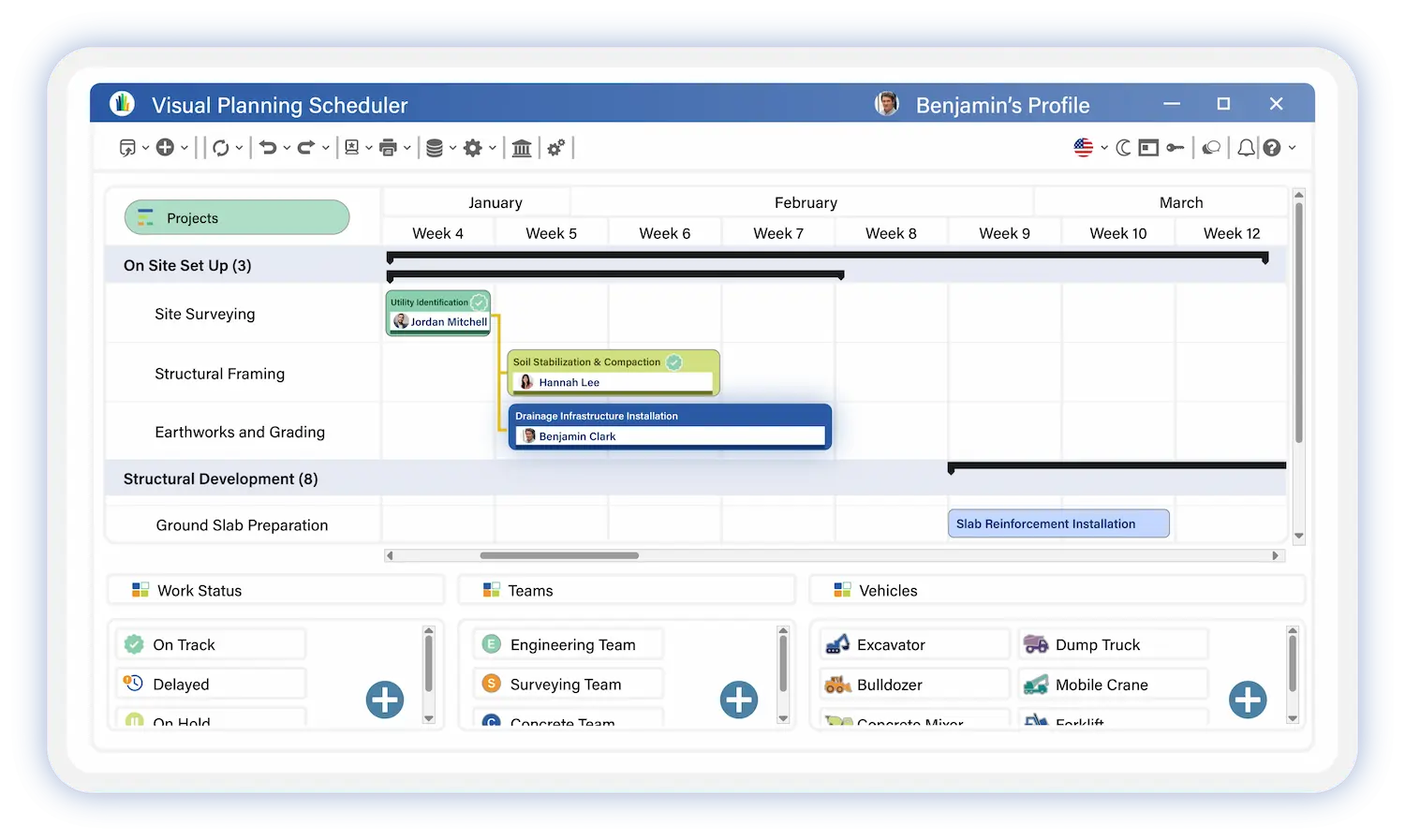
Construction Scheduling
From Initial Work Phasing to Detailed Daily Schedule
Build your construction schedule with a Gantt view designed around how construction actually works: phases, trade packages, task dependencies, and contractual milestones.
- Schedule by phase, work package, and trade crew
- Finish-to-start and start-to-start task dependencies
- Automatic critical path method (CPM) to flag blocking tasks
- PDF export for owner submittals, job site meetings, and project closeout
Workforce & Resource Management
The Right Crew on the Right Work at the Right Time
Field crews, subcontractors, temp workers, and equipment. Visual Planning centralizes your entire field operation in one view.
- Crew scheduling by qualification: field workers, subcontractors, and temp labor
- Equipment scheduling: cranes, aerial lifts, concrete mixers, and heavy machinery
- Automatic alerts for resource conflicts and overloads
- Certification, credential, and medical clearance tracking
- Real-time labor hours and cost tracking by task


Scenario simulation
Equipment and Asset Scheduling Across Every Job Site
Before assigning a piece of equipment to a new job, Visual Planning shows you exactly what is available, what is committed, and where conflicts exist across your active operations.
- Equipment and machinery availability visualization
- Instant conflict detection across reservations
- Asset allocation across multiple job sites
- Coordination of technical resources and vehicles
- Fast reassignment when conditions change on site
Connectivity
Connects to Your Construction Tech Stack
Visual Planning integrates with the business systems your construction operation already runs on. Project data, billing, payroll, and HR information flow automatically between systems with no duplicate entry.
ERP
MES
CMMS
WMS
SCADA
PLCs
Excel
APIs
Duplicate data entry
REST & SOAP
Real-time synchronization
Built for Every Role on the Project Team
A tool designed for everyone involved in the project, from the project manager to the field team, including contractors and management.
Superintendent
Site, teams, daily progress
Project Manager
Overall management, arbitration, reporting
You own the field. Daily crew assignments, progress tracking, incident reporting, and schedule updates — all from your phone, even without a signal.
Log progress from mobile, with or without connectivity
Track progress and work orders directly from the field, even without a network connection.
Report incidents, punch list items, and field photos instantly
Instantly share issues, notes, and photos with project teams.
View daily crew assignments and availability
Organize teams and check availability directly from the schedule.
Receive alerts and instructions from the project manager
Review the instructions and alerts sent by the site supervisor.
Track hours worked and labor costs by task
Track site hours and time spent on each task in real time.
Switch between agenda and Gantt views based on what you need
View the schedule using the display mode that best suits your organization.
You need a clear picture across every active job to make the right calls. Visual Planning gives you portfolio visibility, resource arbitration, and reporting tools without chasing field updates.
Portfolio view across all active projects
Instantly view delays, bottlenecks, and critical points.
Comparison of Planned vs. Actual Schedule
Analyze progress variances and anticipate project deviations.
Budget tracking and labor costs
Track expenses and costs on a project-by-project basis.
Automated reports for management and project owners
Generate clear, up-to-date reports in just a few clicks.
Subcontractor Management and Work Site Conditions
Centralize contracts, progress tracking, and administrative approvals.
Impact analysis and trade-offs between projects
Make quick decisions about resources and priorities in the field.
Case Study
Built for Every Type of Construction Project
Whether you're managing a 3-week construction project or a 3-year real estate development, Visual Planning adapts to your on-site reality.
Residential and Commercial Development
Multi-building program tracking, unit scheduling, and trade coordination across complex phased projects.
Civil Engineering and Infrastructure
Road construction, underground utilities, bridges, and public works — with multi-site phase planning and heavy resource management.
Maintenance and Renovation
Planned maintenance work, scheduled shutdowns, and emergency repair dispatch across active facilities.
Industrial Construction
Industrial build-outs, equipment installation, and commissioning coordination with strict sequencing requirements.
Ready to take back control of your construction sites?
A 30-minute demo tailored to your specific needs and organization.

Field-First Mobile Access
Your superintendents work on job sites, not at desks. Visual Planning's mobile app gives field teams full schedule access and update capabilities from any device, anywhere.
Progress Entry
Update task and work order status directly from the field.
Offline Mode
Access your schedule without an internet connection.
Automatic Sync
Data syncs the moment connectivity is restored.
Hours and Crew Tracking
Log hours worked and labor time from mobile, by task and crew member
Getting Started Is Fast
Personalized Setup
A dedicated consultant configures Visual Planning to your workflows and project structure.
Team Training
Admin and end-user training included. Your team is productive from day one.
Expert Support
A dedicated support team that knows construction operations, available five days a week.
Trusted By


Secure data hosting
GDPR compliant
Certified data centers
48-hour deployment
Guided onboarding included
5-day expert support
A dedicated team that understands your business and your challenges
ROI in 3 months
Average 35% time savings within 3 months
Construction Site Tracking
Frequently Asked Questions
How is this different from standard project management software?
Visual Planning is built around construction field realities: trade crew management, heavy equipment scheduling, subcontractor coordination, contractual milestones, offline mobile access, and job site progress tracking. It is a field operations tool, not a repurposed office productivity app.
Can superintendents use it in the field without a long training period?
Yes. The mobile interface is designed for field use. Most superintendents are logging progress, reporting incidents, and checking assignments within their first day. No technical background required.
Can Visual Planning connect to our billing software or construction ERP?
Yes. Visual Planning connects to SAP, Sage, Cegid, Microsoft Dynamics, Business Central, and other construction ERP systems via REST API. Billing, payroll, and project cost data flows automatically between systems with no manual re-entry.
Can the platform manage multiple job sites simultaneously?
Yes. Visual Planning is built for multi-site construction operations. Project managers get a portfolio view across every active job. Each superintendent sees only their own site. Resources shared across sites are tracked and conflict-checked automatically.
How does this page differ from the Visual Planning construction industry page?
The construction industry page is built for executive leadership — directors, COOs, and VPs focused on portfolio profitability, workforce capacity planning, RFP response, and regulatory compliance at the company level. This page is built for the people running job sites day to day: superintendents, project managers, and field crews focused on task progress, crew assignments, and real-time site coordination.
How quickly can we get Visual Planning running on our job sites?
Most construction teams are operational within 48 hours. A dedicated consultant handles configuration, onboarding, and training. Your superintendents can be logging field updates on day two.
Stop Finding Out About Job Site Problems After They Have Already Cost You.
800+ construction companies use Visual Planning to track every crew, every task, and every deadline in real time. See what that looks like on your job sites.
✓ Guided setup by our experts
✓ 20-day free trial
✓ Fast deployment