




Visual Planning and HRIS : The Right Tool to Manage Your Workforce
Your HRIS manages HR data. Visual Planning coordinates the teams that depend on it.
Optimize your human resource management with Visual Planning — the scheduling platform that centralizes your workforce schedules, syncs your HR tools, and improves daily productivity across every department.
What is an HRIS?
A Human Resources Information System (HRIS) is software that centralizes and automates all HR processes across your organization.
- Employee data and personnel records
- Workforce scheduling and assignments
- Payroll processing
- Absence and time-off management
- Skills and training tracking

Why Use Visual Planning With Your HRIS?
Visual Planning integrates with your HRIS to improve workforce management
and streamline HR processes across the organization.
Centralize HR schedules
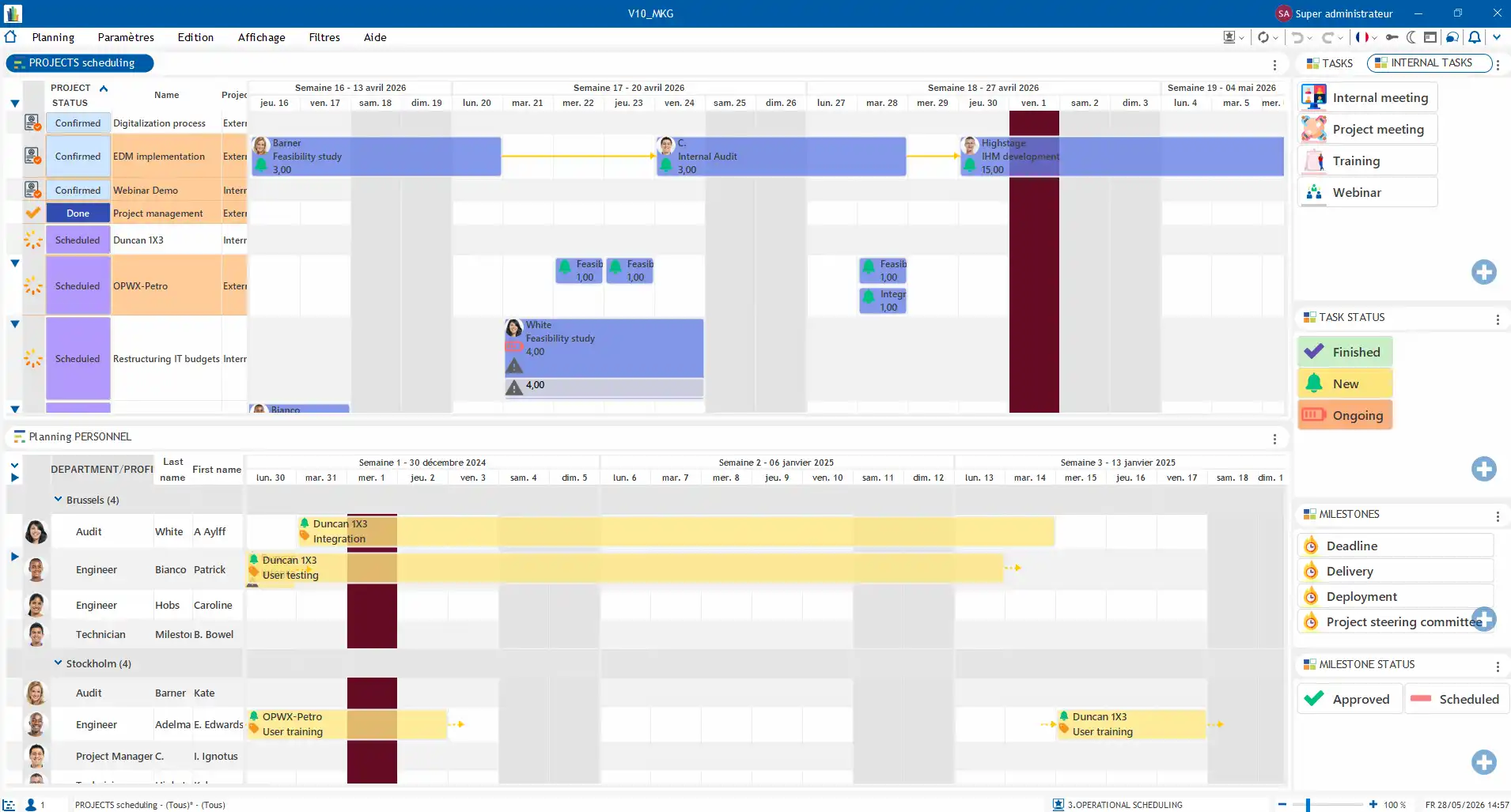
Bring all team schedules into one shared environment — availability, assignments, absences, and activities visible in real time by every relevant stakeholder.
Optimize Resource Allocation
Assign the right team members to the right work based on skills, availability, and operational constraints to maximize workforce efficiency.
Synchronize Your HR Tools
Connect Visual Planning to your payroll, time tracking, and HRIS platforms so data flows automatically between systems — no duplicate entry, no information gaps.
Visual Planning's HRIS Integrations
Visual Planning connects to the HR tools already in your information system.
For example:
✓ Silae — payroll management
✓ Kelio — time and attendance tracking
✓ Cantoriel — working time monitoring
✓ Dynamics AX — ERP management
✓ Eurécia — HR management
✓ Workday, ADP, SAP HCM — major US HRIS platforms via REST API
These integrations synchronize data between your HR tools and simplify overall workforce management across the organization.

Visual Planning Features for HRIS Integration
A complete solution to manage your workforce effectively.
- Personnel Administration
- Document Management
- Absence and Time-Off Management
- Skills and Competency Management
- Performance Tracking
Centralize All Your HR Data in One Place
Visual Planning centralizes the administrative information tied to each employee — employment contracts, personal data, professional documents, and activity history. This information is accessible directly from the scheduling environment, making team organization and day-to-day resource management straightforward.

Access Every HR Document in a Few Clicks
The VP Documentum module centralizes and secures all documents linked to employees, projects, and activities. Each resource can be associated with specific documents:
- Employment contracts and amendments
- Supporting documents and certifications
- Interview and performance review records
- Technical specifications and procedures
- Project briefs and scope documents
Documents are accessible directly from the schedule — simplifying information access and sharing across teams without navigating separate systems.

Anticipate Absences and Protect Your Schedules
Visual Planning centralizes and displays all staff unavailability in real time:
• Vacation and PTO
• Sick leave
• Remote work
• Exceptional and unplanned absences
This information integrates directly into the schedule to maintain a clear view of availability and prevent assignment conflicts before they disrupt operations.
The system automatically detects scheduling conflicts including:
• Overlapping absences across the same team
• Understaffing situations by department or team
• Workload overloads before they become delivery problems
Get the Right Skills on the Right Work at the Right Time
Skills management identifies and structures each employee's capabilities. Every resource can be associated with a competency framework — making it straightforward to:
•Assign the right people to the right assignments based on actual qualifications
• Optimize resource allocation across projects and departments
• Plan projects based on available expertise rather than assumptions
This helps managers make better use of the talent already in the organization and anticipate hiring or training needs before gaps impact delivery.

Your Operation With the KPIs That Matter
Visual Planning tracks team activity and performance through customizable dashboards and key indicators. Managers analyze:
• Workload by employee and team across defined time periods
• Resource utilization rates against available capacity
• Schedule balance across departments and service areas
These indicators accelerate decision-making and let managers adjust workforce organization quickly when operational priorities shift.
Why Integrate Visual Planning With Your HRIS?
- Better Visibility
Visualize all your resources, availability, and assignments in real time from one centralized schedule.
- Optimized Scheduling
Organize teams and projects efficiently while accounting for HR and operational constraints.
- Process Automation
Reduce manual tasks and save time on schedule creation and updates across HR and operations.
- HR Tool Synchronization
Connect all your systems for automatic data flow and maximum operational efficiency.
HRIS Integration
Frequently Asked Questions
What is an HRIS and how does Visual Planning complement it?
A Human Resources Information System centralizes and automates HR processes — employee data, payroll, absences, and skills tracking. Visual Planning complements the HRIS by adding the workforce scheduling and team coordination layer most HRIS platforms were not designed to provide. The two tools integrate via REST API so data flows automatically between systems.
Does Visual Planning replace an HRIS?
No. Visual Planning does not replace an HRIS. It complements it by adding a centralized scheduling view of teams, availability, and assignments — connected to the HR data already in your existing HRIS.
Which HRIS platforms can connect to Visual Planning?
Visual Planning integrates with Silae, Kelio, Cantoriel, Eurécia, Dynamics AX, Workday, ADP, SAP HCM, and other HRIS platforms via REST API. For specific HRIS configurations, the technical team builds custom connectors.
Can Visual Planning manage absences and time-off requests?
Yes. Visual Planning centralizes vacation, PTO, sick leave, and unavailability in the shared schedule. Managers see absences in real time, identify coverage impacts, and organize replacement coverage before it disrupts operations.
Can Visual Planning track employee skills and certifications?
Yes. Visual Planning tracks skills, certifications, and required credentials by employee with automatic expiration alerts. Managers assign resources based on actual qualifications and anticipate training needs before gaps impact operations.
How long does it take to integrate Visual Planning with our HRIS?
Integration timelines depend on complexity and the systems involved. A dedicated consultant scopes the project, defines data flows, and supports the technical team through to production go-live. Most HRIS integrations are operational within a few weeks.
Your HRIS Manages Your HR Data. Visual Planning Coordinates the Teams That Depend on It.
Connect Visual Planning to your HRIS and give HR managers and operations leaders a unified view of teams, availability, and schedules — in real time.